Keep track of your data collection
Easily follow the collection status for your metering points. In the Metry portal, collection status is shown on the far right for each metering point.

What the status symbols mean:
- Green – We have collected all expected data for the metering point.
- Yellow – Some data is still missing, but this is normal and you do not need to take any action.
- Red – You need to take action for collection to continue working.
Read on to learn more about when the different symbols are displayed for different types of metering points, and what actions you can take.
 | Green – We have collected all expected data for the metering point.
- For utility metering points, this means we have synced last month’s consumption values.
- For sub-metering, you decide yourself whether you want to see status at monthly, daily or hourly level in the metering point’s settings.
- For manually read metering points, it means the meter has been read within the latest reading period.
—|—
 | Yellow – Some data is still missing, but this is normal and you do not need to take any action.
- For utility metering points, this usually means that complete consumption values are not yet available on the utility’s customer portal. Our collection robots sync daily until all values have been collected.
- For manually read metering points, the symbol with a mobile phone is shown when we are waiting for the meter to be read in the Metry Readings app.
—|—
 | Red – You need to take action for collection to continue working.
- For utility metering points, this status is only shown when we suspect the subscription has been terminated. You can either sync with the utility again if you still have the metering point, or move the metering point to the trash if you no longer want to collect data from it.
- For sub-metering, this is shown if the meter has stopped sending readings, or has sent incorrect ones. Hover over the symbol for more information. Click on the metering point to see more details and possible actions.
- For manually read metering points, this symbol is shown if a reading period has been missed. In this case you need to approve interpolation of consumption for a longer time period.
When metering points have this status, a red symbol is shown on the Metering points menu icon. Each tree group also gets a red badge showing the number of metering points with issues, so you can easily find what you need to address. 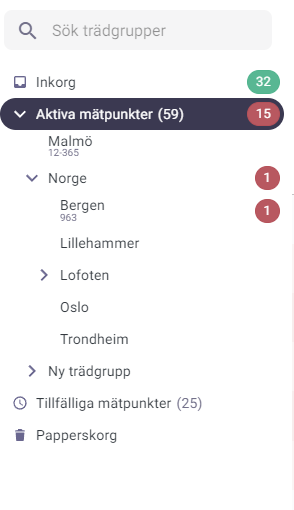 |
|---|
Fine-tuning monitoring settings
You can configure monitoring per metering point by selecting a metering point and going to Settings. Normally you do not need to adjust this, since the system chooses the most appropriate configuration automatically.
Options include turning off monitoring for a metering point, monitoring additional quantities (e.g. both flow and energy for district heating), or adjusting the monitored resolution. Note that you can only monitor resolutions that have been ordered for the metering point.